
Best Wispr Flow alternatives in 2026
Looking for a Wispr Flow alternative? An honest 2026 comparison of Superwhisper, VoiceInk, Aqua Voice and BolWise on price, platforms and languages.
If you're looking for a Wispr Flow alternative, the short answer is this: Superwhisper if you want offline models and a lifetime licence, VoiceInk if you want a one-time purchase on an Apple Silicon Mac, Aqua Voice if you mostly dictate in English, and BolWise if you speak more than one language, mix languages mid-sentence, or want to speak in one language and write in another.
Below is a plain comparison.
Why are people looking for a Wispr Flow alternative?
Wispr Flow is a good product, and it set the bar for dictation apps. So why do so many people go looking for apps like Wispr Flow?
From what people write in public forums, three reasons come up again and again:
- Price. Wispr Flow has a free plan (2,000 words/week). Pro is USD 15/mo. For someone who dictates a few emails a day, that adds up.
- Limits on the free plan. Wispr Flow's free plan caps desktop use at a weekly word allowance. If you dictate for real work, you hit it.
- Reliability. Like every cloud tool, it has bad days. When dictation is how you write, an outage stops your work.
None of this makes Wispr Flow a bad choice. It just means it's worth knowing the options.
What should you look for in an app like Wispr Flow?
Before comparing names, decide what matters to you:
- Platforms. Do you need Mac, Windows, or both?
- Languages. Do you only speak English, or do you switch between languages? Do you ever mix two languages in one sentence?
- Cleanup. Do you want word-for-word transcription, or polished writing with filler words removed and punctuation fixed?
- Privacy. Where does your audio go, and is it kept?
- Price model. Monthly or one-time?
- Free trial. Can you try it properly without a card?
How do the main Wispr Flow alternatives compare?
Prices checked October 2026 on each product's site.
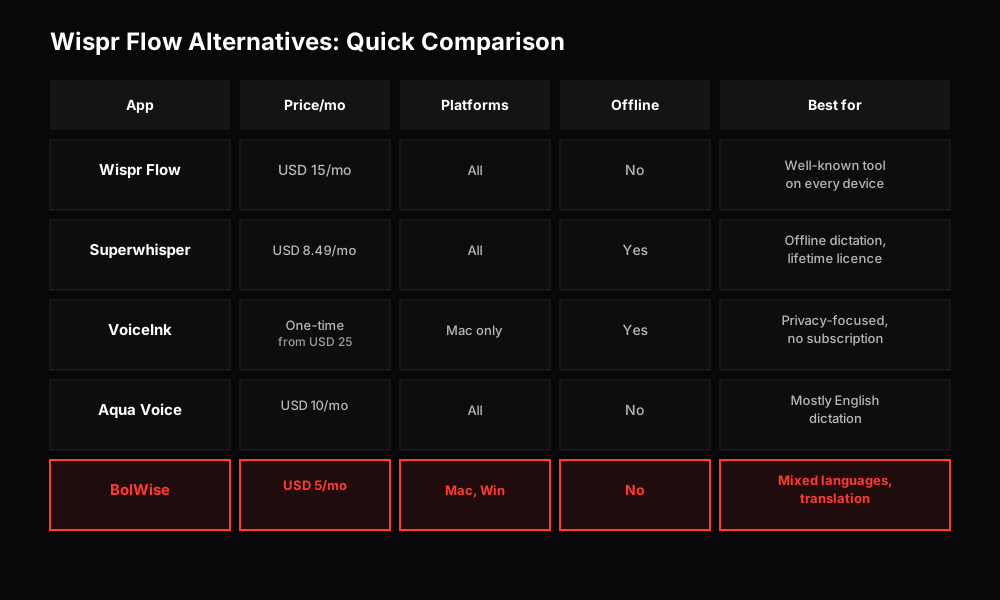
Quick comparison of the main alternatives based on pricing, platforms, and features
Superwhisper: is it a good Wispr Flow alternative?
Superwhisper is one of the best-known apps in this space. Its free tier runs local Whisper models, so you can dictate without sending audio anywhere. The Pro plan is USD 8.49/mo and adds cloud models and AI "modes" that reshape your text for different jobs. A lifetime option exists, and a single Pro licence covers all your devices.
Good for: people who want offline dictation, lots of control over models and prompts, or a lifetime option instead of monthly payments.
Keep in mind: the amount of choice is a strength, but it also means more settings to learn. The best results come from the Pro plan.
VoiceInk: is it a good Wispr Flow free alternative?
VoiceInk is an open-source dictation app that transcribes on your device. It's a one-time purchase starting from USD 25 (1 Mac) instead of a subscription, and a free trial is available. Because the code is public, you can check exactly what it does with your voice.
Good for: Mac and iOS users who care most about privacy and prefer one-time purchases over subscriptions.
Keep in mind: it requires macOS 14.4+ and works on iOS. There's no Windows or Android version.
Aqua Voice: is it a good Wispr Flow alternative?
Aqua Voice runs its own speech model in the cloud and is built around speed and accuracy, especially for English. It's on Mac, Windows, iPhone and Android. There's a free plan (1,000 words). Pro is USD 10/mo.
Good for: people who dictate mostly in English and want a polished, fast experience across devices.
Keep in mind: it works across all platforms but doesn't support offline dictation.
What about BolWise?
BolWise is the app we make, so read this section with that in mind. We'll be specific about what it does and doesn't do.
BolWise is a desktop app for macOS 13+ and Windows 10/11. Hold the key to talk, and get clean text in any app.
Where it's different:
- Mixed-language speech. You can speak any of 99+ languages, and you can switch languages mid-sentence. BolWise detects the language automatically. If you naturally talk in Hindi and English together, or Spanish and English, you don't have to pick one first.
- Polish, not just transcription. By default, your words come out as clean, punctuated writing. If you want exactly what you said, the "As spoken" option keeps it word for word.
- Modes. Modes are saved writing styles. You can keep one for formal emails, one for quick chat replies, one for notes.
- Translation in the same step. Each Mode can have a "Translate to" language. Speak Hindi and get English. Or speak English and get Spanish, French or German for a client. Translation works in both directions, not only into English.
- Privacy. Your history stays on your device, and your audio isn't kept on our servers.
- Price. Pro is USD 5/mo.
Where it's not the right fit:
- No phone app yet. If you need dictation on iPhone or Android today, Wispr Flow, Superwhisper and Aqua Voice cover that.
- No offline mode. If you need to dictate without internet, Superwhisper or VoiceInk is a better choice.
Results usually appear in a few seconds, depending on how long you speak and your connection.
How dictation works
Every app in this space follows the same basic pattern: hold, speak, release, and the text appears.
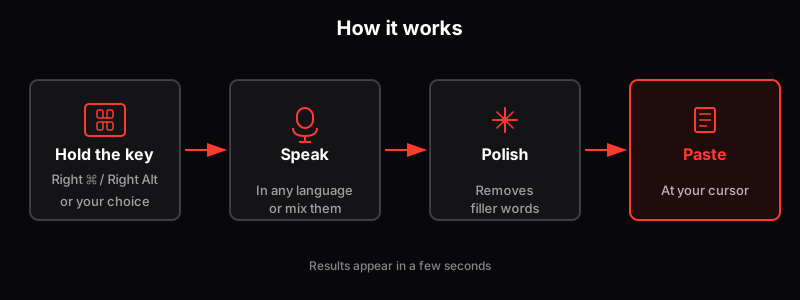
The dictation workflow: hold the key, speak, polish, paste
Who uses an app like this, anyway?
It's easy to think dictation apps are only for people who write code. In practice, the people who get the most from them are anyone who types a lot:
- Sales teams writing follow-ups and CRM notes after every call.
- Marketers drafting posts, briefs and replies.
- Lawyers writing letters and notes.
- Founders and executives clearing an inbox between meetings.
- People who think in one language and write in another, for whom typing in a second language is slow and tiring.
If you write emails all day, you're the audience.
How do you switch from Wispr Flow without losing your workflow?
Switching takes a few minutes:
- Install the new app and grant microphone and accessibility permissions (needed to paste text into other apps).
- Set your dictation key. Pick one that doesn't clash with Wispr Flow, or quit Wispr Flow while you test.
- Recreate your styles. If you used different tones in Wispr Flow, set them up as Modes in BolWise.
- Test in your real apps. Dictate an email, a Slack message and a document. That's where differences show.
- Use the whole trial. Dictate for a week before deciding. First impressions from one sentence don't tell you much.
So which Wispr Flow alternative should you choose?
- You want offline dictation or a lifetime licence: Superwhisper.
- You have an Apple Silicon Mac and want a one-time purchase and open source: VoiceInk.
- You dictate mostly in English and want it on your phone too: Aqua Voice.
- You speak more than one language, mix languages, or want to write in a different language from the one you speak, on Mac or Windows: BolWise.
The best way to decide is to try two of them side by side on the writing you actually do.
Frequently asked questions
Is there a free alternative to Wispr Flow?
Wispr Flow itself now has a free plan with a weekly word limit on desktop. Superwhisper has a free tier that runs local models, and Aqua Voice gives 1,000 free words. BolWise has a free trial of 30 minutes over 14 days with no card.
What is the cheapest Wispr Flow alternative?
Among the subscriptions, BolWise Pro is USD 5/mo. VoiceInk is a one-time purchase starting from USD 25 but only runs on Apple devices (macOS 14.4+ and iOS).
Which Wispr Flow alternative works on Windows?
BolWise, Superwhisper and Aqua Voice all run on Windows. VoiceInk is Mac-only.
Which alternative is best for speaking more than one language?
If you switch languages mid-sentence, such as Hindi and English, try BolWise. It detects the language automatically, handles mixed speech, and can translate as it writes.
Does BolWise work on my phone?
Not yet. BolWise is a desktop app for macOS 13+ and Windows 10/11.
Speak the way you think, in any language or a mix of them, and get polished writing in any app on Mac and Windows.
30 minutes over 14 days, no card