
Think in your language, write in English
Speak Hindi, Spanish or any language and get polished English in any app, or speak English and write in another language. Dictate and translate at once.
If you think faster in Hindi, Spanish, Arabic or any other language but have to write in English, you can speak in your own language and get polished English in one step. BolWise does this on Mac and Windows: hold the key, speak, and English text is pasted wherever your cursor is. It works the other way too: speak English and write in another language.
Why is writing in a second language so tiring?
Many people speak English well and use it at work every day, yet writing in it still takes longer than it should. You know what you want to say. The slow part is finding the right words, getting the grammar right and making it sound professional.
So people work around it. They write in their own language and paste it into a translation website. They type a rough English draft and ask a chatbot to fix it. Or they just spend twenty minutes on an email that should take three.
Each workaround adds steps: open another tab, copy, paste, check, copy again. If you do this ten times a day, it adds up.
Can I speak in my language and get English text directly?
Yes. In BolWise, each Mode (a saved writing style) can have a Translate to language. Set it to English, then:
- Put your cursor where you want to write: an email, Slack, a document, a CRM.
- Hold the key and speak in your language.
- Let go. Polished English is pasted at your cursor, usually in a few seconds.
There's no separate translation website, and no copying and pasting.
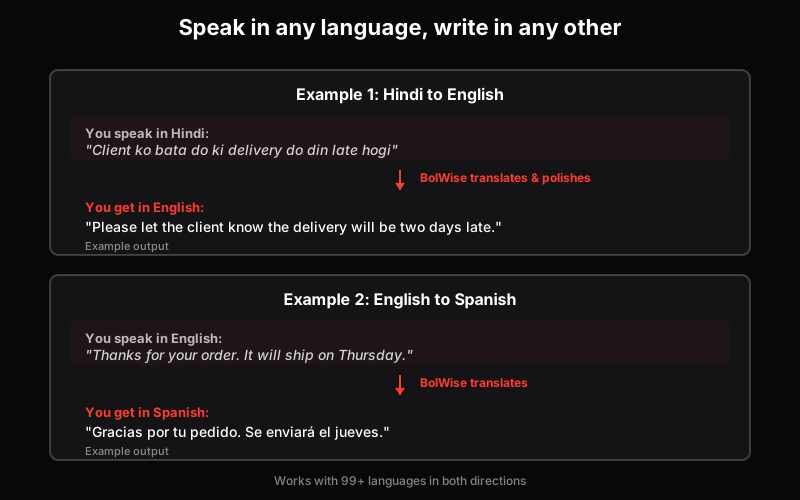
Examples: Hindi → English and English → Spanish — works with 99+ languages
Can I speak English and write in another language?
Yes. Translation works in both directions. Set Translate to to Hindi, Spanish, French, German, Arabic or another language, and speak in English.
That's useful when:
- A customer prefers to be written to in their own language.
- You're sending a notice to staff who read Hindi more comfortably.
- You work with a supplier in Germany or a client in Mexico.
- You're writing to family in your home language but think in English at work.
For example, you might say in English:
"Thanks for your order. It will ship on Thursday, and you'll get a tracking link by email."
And with Translate to Spanish, get something like:
"Gracias por tu pedido. Se enviará el jueves y recibirás un enlace de seguimiento por correo electrónico."
Can I mix languages while I speak?
Yes. Most people who speak two languages mix them, and BolWise is built for that. It supports 99+ languages and detects them automatically, even when you switch mid-sentence. You don't pick a language before you start.
If you speak Hindi and English together, see our guide to Hinglish voice typing on a laptop.
How is this different from using a translation website?
A translation website is great for reading something in another language. For writing, the difference is the number of steps:
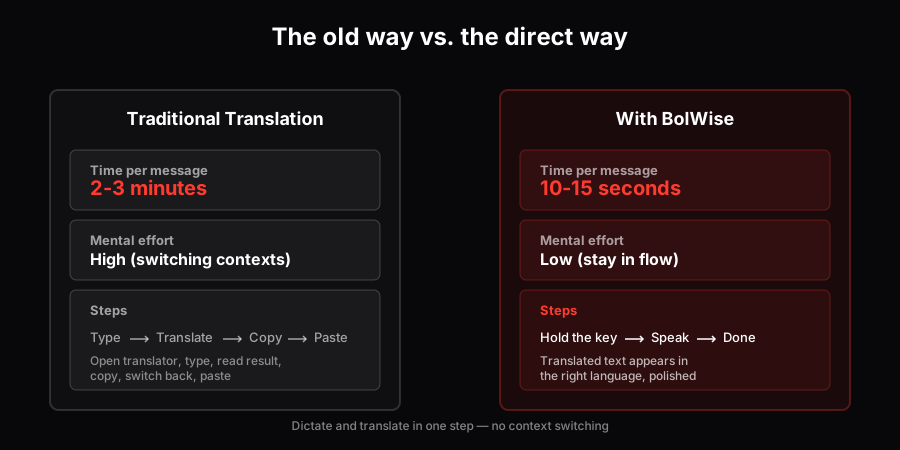
Translation website vs BolWise: fewer steps, better output
The last row matters. Translating a rough spoken thought word for word often gives you rough text. BolWise cleans it up as it writes, so the result reads like an email, not a transcript.
How do I set up Modes for different languages?
A simple setup most people find useful:
- Work email: polished, Translate to English.
- Customer reply: polished, Translate to your customer's language.
- Family: Translate to your home language.
- Notes: "As spoken", which keeps your exact words in the language you used.
Switch Modes depending on who you're writing to. Your words stay the same; the output changes.
What does a typical day look like with this?
Picture a sales manager in Pune. A client call happens in a mix of Hindi and English. Straight after, she opens Gmail, switches to her "Work email" Mode, holds the key and talks through the follow-up the way she'd explain it to a colleague. A clean English email appears in the draft. She reads it, fixes one name, and sends it.
An hour later, a supplier in Spain needs a delivery update. She switches to a Mode set to Translate to Spanish, speaks in English, and the reply is written in Spanish. In the evening, she sends a message to her parents in Hindi from the same laptop, with the same key.
Three languages, one tool, and no copying between tabs.
Who is this for?
Anyone who thinks in one language and writes in another:
- Sales teams writing follow-ups to clients in different countries.
- Marketers drafting posts and briefs for an English-speaking audience.
- Lawyers and office staff preparing letters in formal English.
- Founders and executives writing to investors and partners.
- Students writing assignments in English.
- Anyone working abroad who writes to colleagues in one language and family in another.
Is the translation always right?
No translation is perfect, from any tool. BolWise gives you a good, polished draft, usually in a few seconds. For important messages, read it over before sending, especially names, numbers, dates and legal or medical terms. Saying names clearly helps a lot.
What about privacy?
Your dictation history stays on your device, and your audio isn't kept on BolWise servers.
Where does this fit among other dictation apps?
Most dictation apps focus on English or on one language at a time. If you're comparing options, our comparison of Wispr Flow alternatives covers the main ones honestly.
Frequently asked questions
Can I speak in my language and get English text?
Yes. In BolWise, set a Mode's 'Translate to' option to English, then speak in any of 99+ languages. Polished English is pasted at your cursor.
Can I speak English and get another language?
Yes. Set 'Translate to' to the language you want, such as Hindi, Spanish or German, and speak in English.
Can I mix languages while I speak?
Yes. BolWise detects the language automatically, even when you switch mid-sentence.
Should I check translated text before sending it?
For important messages, yes. Read it over, especially names, numbers and legal or medical terms.
Does it work on Windows and Mac?
Yes. BolWise runs on macOS 13+ and Windows 10/11. It isn't on phones yet.
Speak the way you think, in any language or a mix of them, and get polished writing in any app on Mac and Windows.
30 minutes over 14 days, no card