
Best dictation apps for Mac 2026
The best dictation apps for Mac in 2026, compared honestly: Apple Dictation, Wispr Flow, Superwhisper, VoiceInk, Aqua Voice and BolWise.
The best dictation app for your Mac depends on how you write. For quick, free dictation, Apple's built-in Dictation is already there. For polished writing in any app, the main choices are Wispr Flow, Superwhisper, VoiceInk, Aqua Voice and BolWise. If you speak more than one language, or mix languages in a sentence, BolWise is built for that.
Below is a plain comparison.
What makes a good dictation app for Mac?
A dictation app turns your speech into text. The good ones in 2026 go further and give you writing you can send. When comparing, look at:
- Where it works. Does it paste text into any app, or only one?
- Cleanup. Does it remove filler words and fix punctuation, or give you a raw transcript?
- Languages. How many does it support, and can you mix them?
- Privacy. Is your audio processed on your Mac or in the cloud, and is it kept?
- Price. Free, monthly or one-time?
- Requirements. Some apps need Apple Silicon or a recent macOS.
Is Apple's built-in Dictation good enough?
For short messages, often yes. It's free, it's already on your Mac, and you can turn it on in System Settings under Keyboard.
Where it falls short is longer writing. You get your words more or less as spoken, so you'll spend time on punctuation, filler words and structure. It also expects you to set a language, so mixing two languages in one sentence is hard.
If you dictate a few lines a day, start here. If you write emails and documents all day, a dedicated app usually pays for itself in time saved.
How do the best Mac dictation apps compare?
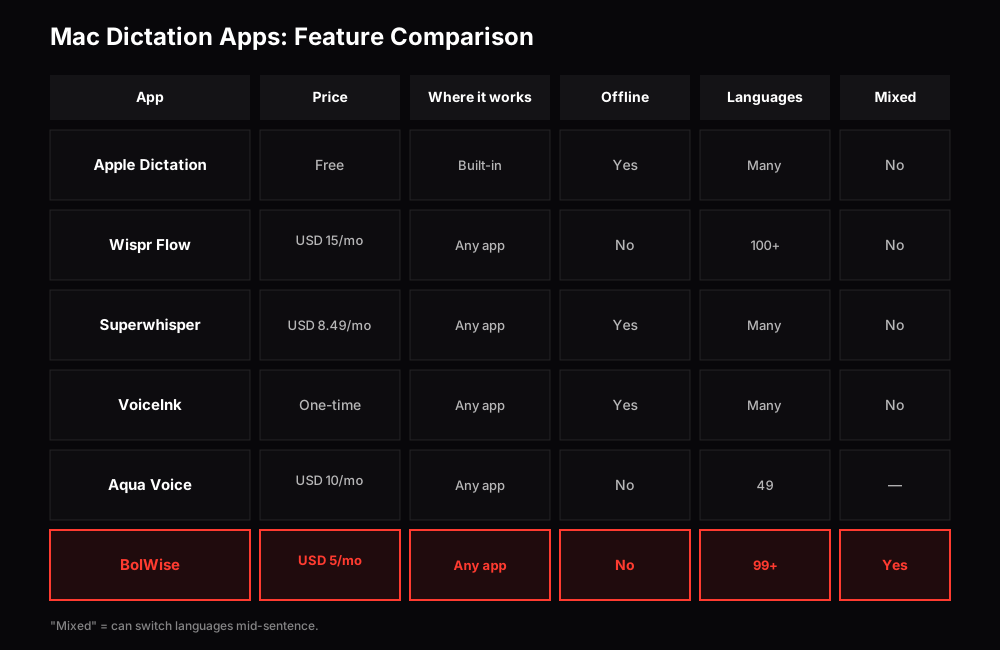
Feature comparison: BolWise is built for mixing languages mid-sentence. Prices checked October 2026 on each product's site.
Is Wispr Flow the best dictation app for Mac?
Wispr Flow is the best-known name, and for good reason: speak, and clean text appears in any app. It runs on Mac, Windows, iPhone and Android. There's a free plan (2,000 words/week). Pro is USD 15/mo.
Good for: people who want a polished, well-known tool on every device.
Keep in mind: the Pro price is the highest here. If you're weighing a switch, read our guide to the best Wispr Flow alternatives.
Is Superwhisper worth it on Mac?
Superwhisper offers both free and paid tiers. The free tier runs local models on your Mac, so you can dictate offline. Pro adds cloud models and AI modes that reshape your text for different jobs, and one licence covers all your devices.
Good for: people who want offline dictation and lots of control over models and prompts.
Keep in mind: more choice means more settings to learn.
Is VoiceInk a good Mac dictation app?
VoiceInk is an open-source Mac app that transcribes on your device. You pay once, and there's a 14-day money-back guarantee.
Good for: privacy-focused Mac users who dislike subscriptions.
Keep in mind: it needs an Apple Silicon Mac with macOS 14.4 or later, and it's Mac-only.
Is Aqua Voice good on Mac?
Aqua Voice runs its own speech model in the cloud and focuses on speed and accuracy, especially in English. It's on Mac, Windows, iPhone and Android, with 1,000 free words to start.
Good for: people who dictate mostly in English.
Keep in mind: it lists 49 languages and needs an internet connection.
Where does BolWise fit?
BolWise is the app we make, so read this with that in mind.
BolWise runs on macOS 13+ and Windows 10/11. Hold the key, speak, and polished writing is pasted at your cursor in any app.
- 99+ languages, mixed mid-sentence. BolWise detects the language automatically. If you talk in Hindi and English together, or Spanish and English, you don't pick one first. See our guide to Hinglish voice typing on a laptop.
- Polished by default, or "As spoken". Get clean writing, or your exact words when you want them.
- Modes. Saved writing styles: one for formal email, one for chat, one for notes.
- Translate to. Each Mode can write in a different language from the one you speak. Speak Hindi, get English; speak English, get Spanish. More on that in Think in your language, write in English.
- Privacy. History stays on your Mac, and audio isn't kept on our servers.
- Price. USD 5/mo.
Keep in mind: BolWise isn't on phones yet, and it needs an internet connection. Results usually appear in a few seconds.
Which Mac dictation app is right for you?
- You dictate a little and want free: Apple Dictation.
- You want a well-known tool on every device: Wispr Flow.
- You want offline dictation or a lifetime licence: Superwhisper.
- You have an Apple Silicon Mac and want a one-time, open-source app: VoiceInk.
- You dictate mostly in English: Aqua Voice.
- You speak more than one language, mix them, or want to write in a different language from the one you speak: BolWise.
Who actually uses dictation on a Mac?
Anyone who types a lot. Sales teams writing follow-ups, marketers drafting posts, lawyers writing letters, executives clearing their inbox, students writing notes, and people who think in one language and write in another. If your day is mostly email and documents, dictation can give you real time back.
How do I get the most from any Mac dictation app?
- Speak in full thoughts rather than single words.
- Use a quiet room or a headset.
- Say names clearly, since that's where most errors happen.
- Set up styles for the kinds of writing you do most.
- Try it for a week on real work before deciding.
Frequently asked questions
What is the best free dictation app for Mac?
Apple's built-in Dictation is free and already on your Mac. If you want polished text, Superwhisper and Wispr Flow have free tiers, Aqua Voice gives 1,000 free words, and BolWise has a free trial of 30 minutes over 14 days with no card.
Which Mac dictation app works offline?
Superwhisper's local models and VoiceInk transcribe on your Mac, so they can work without internet. BolWise, Wispr Flow and Aqua Voice need a connection.
Which Mac dictation app is best for more than one language?
If you switch languages mid-sentence, such as Hindi and English, BolWise detects the language automatically and can translate as it writes.
Do these apps work in any Mac app?
Wispr Flow, Superwhisper, VoiceInk, Aqua Voice and BolWise all paste text where your cursor is, so they work in email, chat, documents and browsers.
Do I need an Apple Silicon Mac?
VoiceInk needs Apple Silicon and macOS 14.4 or later. BolWise runs on macOS 13 or later. Check each app's requirements before you buy.
30 minutes over 14 days, no card